
Rent collection, without the chasing.
PropHaven invoices tenants on schedule, reminds them before rent is due, flags arrears and records every EcoCash, bank and cash payment against the right invoice. Tenants keep paying the way they already do. PropHaven keeps the record straight.
How it works
One schedule, then it runs itself.
Set each lease's billing schedule once. This is the monthly routine from then on.
- 01
The invoice goes out
Created on schedule and emailed to the tenant, with a PDF and a secure link that expires.
- 02
A reminder, 3 days before it's due
Sent by email automatically.
- 03
Unpaid invoices are marked overdue
Once the due date passes, they show on your arrears report.
- 04
The late fee follows your rules
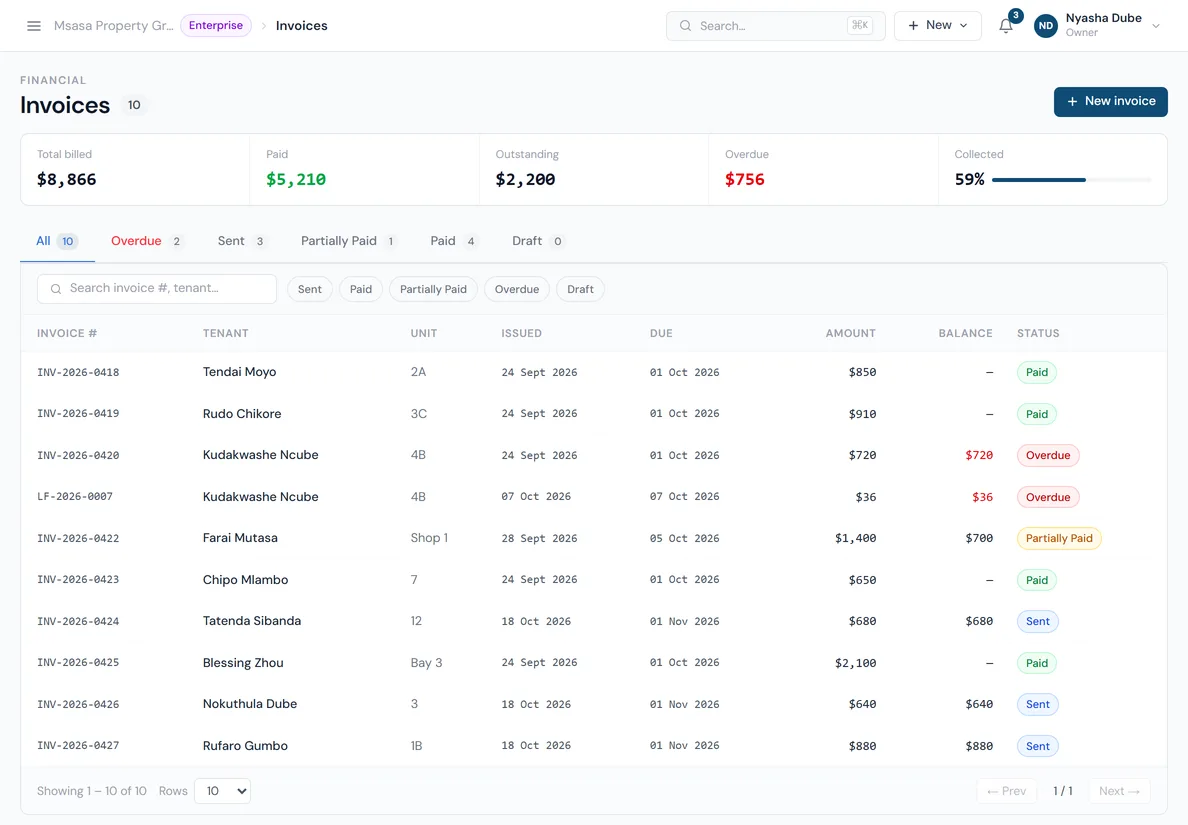
After your grace period: a flat amount, a percentage of rent or a daily charge, up to your cap. Set it for everyone, or per lease.
- 05
You record the payment
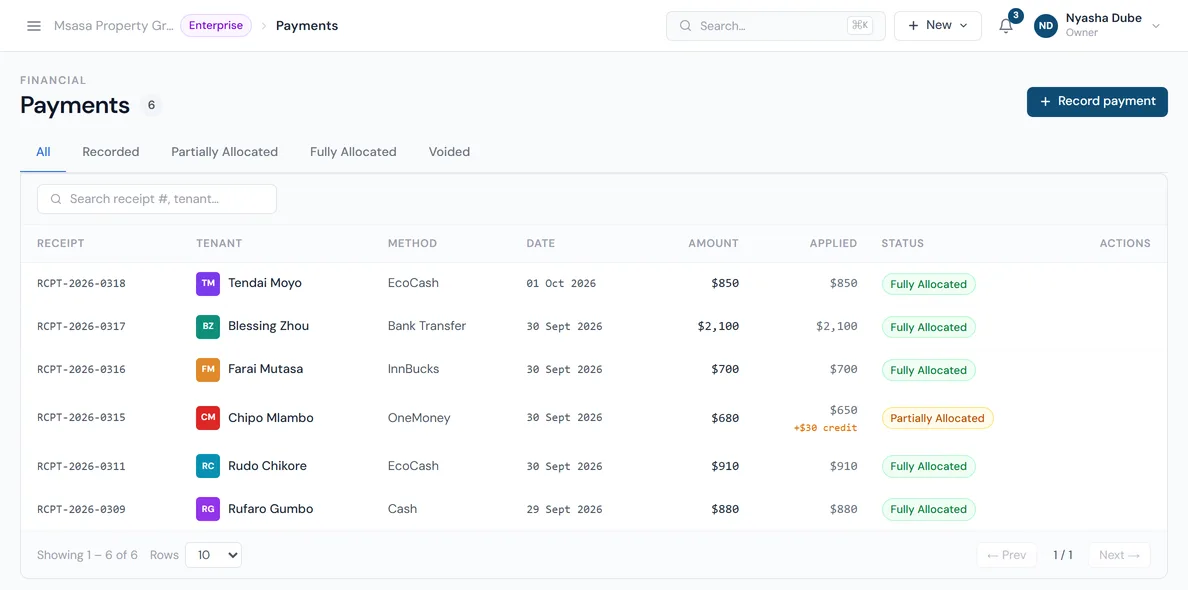
Pick the method (EcoCash, OneMoney, InnBucks, bank, cash or card) and enter the reference. PropHaven applies it to the oldest invoice first, or you allocate it yourself.
Recording payments
Every payment, matched to the right invoice.
PropHaven doesn't take payments itself. It keeps the record of every payment your tenants make, wherever they make it.
- Any payment method
- Cash, bank transfer, EcoCash, OneMoney, InnBucks, other mobile money, card, cheque and money order. Rename them or add your own.
- The reference, every time
- Store the EcoCash code or bank reference with each payment, so disputes come down to a record, not memory.
- Oldest invoice first
- Payments are allocated to the oldest unpaid invoice automatically, or you split them across invoices yourself.
- Part payments and credit
- Partly paid invoices show what's left. Overpayments stay on the tenant's account as credit.
- Numbered receipts
- Every payment gets its own receipt number, so the books line up with what tenants were told.
- Corrections without deleting
- Credit notes and write-offs keep the history intact when something needs adjusting.
- Several currencies
- Invoice in USD, ZAR, BWP and more, with exchange rates you set (Standard and above).
- Reports from the same data
- Rent roll, arrears, collections and cash flow come straight from the invoices and payments you already have.
Arrears
See who owes what, at a glance.
Totals for billed, paid, outstanding and overdue sit above the invoice list. Late fees appear as their own invoices, so the original rent stays clear. Set your rules on the late fees page.
FAQ
Rent collection questions.
Not answered here? Email hello@prophaven.co.zw. It goes to the team that builds PropHaven.
Can tenants pay rent online through PropHaven?
Not yet. Tenants pay the way they do now (EcoCash, bank transfer or cash) and you record the payment with its reference. It's allocated to their invoices and appears in their portal straight away.
How often are invoices created?
On each lease's billing schedule: weekly, every two weeks, monthly, quarterly or annually. PropHaven checks schedules every hour, so invoices go out on time without anyone pressing a button.
Does it send SMS or WhatsApp reminders?
Not yet. Invoices and the reminder 3 days before the due date go out by email, and tenants also see notifications in their portal.
What happens when a tenant pays too much or too little?
A part payment leaves the invoice partly paid, with the balance still showing. An overpayment is kept on the tenant's account as credit.
Keep reading
More of PropHaven.
- Late fees Flat, percentage or daily late fees, applied automatically after your grace period.
- Maintenance Requests with photos, work orders, vendors and a full status history.
- Tenant portal Tenants see their lease and payments, report repairs and message you.
- Late fee calculator Work out a late fee for any rent amount, grace period and fee type.
- CSV import templates The exact files PropHaven imports tenants, leases and owners from.