
Late fees that apply themselves, by your rules.
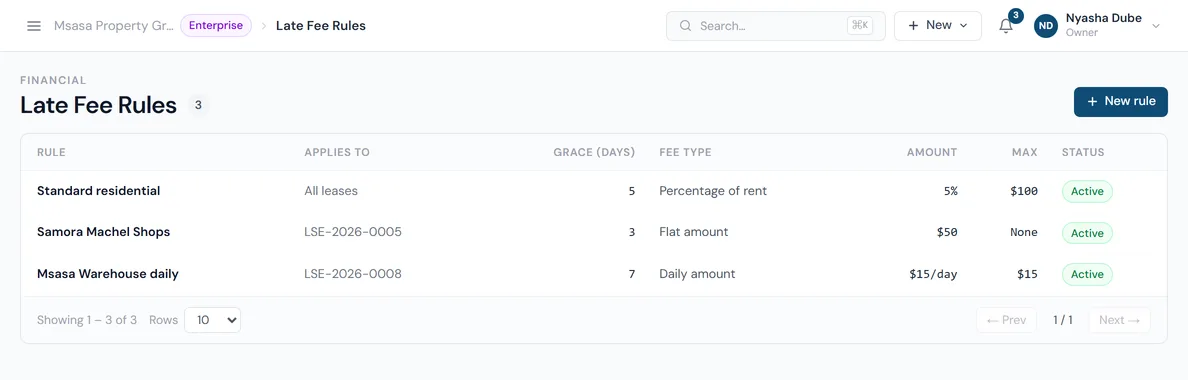
Set a rule once, for every lease or just one. PropHaven checks overdue rent every hour and, once your grace period has passed, adds the late fee as its own invoice. No reminders to yourself, no awkward maths.
Fee types
Four ways to charge.
Examples use a $720 rent invoice.
| Fee type | How it's charged | Example |
|---|---|---|
| Flat amount | Once per overdue invoice | $50 |
| Percentage of rent | Once, as a % of the invoice total | 5% → $36 |
| Daily amount | Every day after the grace period | $15 a day |
| Daily percentage | Every day, as a % of the invoice total | 1% → $7.20 a day |
Rule settings
Fair to tenants, firm on arrears.
Each rule has a few settings, so you can match what your lease agreements actually say.
- Grace period
- How many days after the due date before any fee applies. The default is 5.
- Maximum fee
- A cap on each fee charged. For daily fees, it caps each day's charge.
- Max days to charge
- For daily fees: stop after this many daily charges.
- Minimum invoice amount
- Skip late fees on invoices smaller than this.
- Everyone, or one lease
- Set an organization-wide rule, then override it for a specific lease. The lease's own rule wins.
- On or off
- Switch a rule off without deleting it.
FAQ
Late fee questions.
Not answered here? Email hello@prophaven.co.zw. It goes to the team that builds PropHaven.
How is a late fee calculated?
Once an overdue rent invoice is past your grace period, PropHaven applies your rule: a flat amount, a percentage of the invoice total, or the same as a daily charge. Each fee is capped at your maximum, and rounded to the cent.
Is the late fee added to the rent invoice?
No. Each late fee is its own invoice, numbered separately and linked to the rent invoice it came from. The original rent stays clear, and a fee can be written off on its own.
When does PropHaven check for late fees?
Every hour. A one-time fee is charged once per overdue invoice; a daily fee is charged at most once a day.
Why hasn't a late fee been applied?
Check that the invoice is a rent invoice, that it's past the grace period, that it's above your minimum invoice amount, that the rule is switched on, and that your organization has a default tax rate set up. Late fees are skipped until one exists.
Keep reading
More of PropHaven.
- Rent collection Invoices on schedule, reminders, arrears and every EcoCash, bank and cash payment recorded.
- Maintenance Requests with photos, work orders, vendors and a full status history.
- Tenant portal Tenants see their lease and payments, report repairs and message you.
- Late fee calculator Work out a late fee for any rent amount, grace period and fee type.
- CSV import templates The exact files PropHaven imports tenants, leases and owners from.